Monday, 14 July 2025

ADPRECLONE.PL Fails With Error 'CLONE-20435 Some of the Oracle Homes are excluded during copy operation EBS R12.2.X

 Dear All,


In this post i am sharing one of the issue which i got the recently in My EBS R12.2.10 with 19C Database issue while running adpreclone.pl got the below error .

When running  $ADMIN_SCRIPTS_HOME/adpreclone.pl on an application node, the below error occurs in $INST_TOP/admin/log/clone/fmwT2PStage/CLONEXXXXXX_XXXXX.error file:


SEVERE : <DATE&TIME> - ERROR - CLONE-20435 Some of the Oracle Homes are excluded during copy operation.

SEVERE : <DATE&TIME> - CAUSE - CLONE-20435 The following Oracle Homes were excluded during copy operation.

[/u07/EBSApps/Oracle/fs1/FMW_Home/webtier, /u07/EBSApps/Oracle/fs1/FMW_Home/oracle_common] , and possible causes were:

1. All the Oracle Homes were not registered with one OraInventory.

2. If all Oracle Homes were registered with a single custom OraInventory, then corresponding inventory pointer file was not provided to T2P operation.

3. Canonical path of Oracle Home registered with OraInventory was not child of Middleware Home.

SEVERE : <DATE&TIME> - ACTION - CLONE-20435 Make sure that all possible causes mentioned in above CAUSE section are taken care.

SEVERE : <DATE&TIME> - ERROR - CLONE-20218 Cloning is not successful.

SEVERE : <DATE&TIME> - CAUSE - CLONE-20218 An internal operation failed.

SEVERE : <DATE&TIME> - ACTION - CLONE-20218 Provide the clone log and error file for investigation.

java.lang.Exception: Some of the Oracle Homes are excluded during copy operation.

at oracle.as.clone.cloner.builder.CreateClonerBuilder.showMessageIfAnyOHIgnored(CreateClonerBuilder.java:1356)

at oracle.as.clone.cloner.builder.CreateClonerBuilder.getMWAndOHCreateClonerObjects(CreateClonerBuilder.java:226)

at oracle.as.clone.cloner.builder.CreateClonerBuilder.getCreateClonerObjects(CreateClonerBuilder.java:147)

at oracle.as.clone.cloner.builder.CreateClonerBuilder.getClonerObjects(CreateClonerBuilder.java:133)

at oracle.as.clone.process.CloningExecutionProcess.execute(CloningExecutionProcess.java:91)

at oracle.as.clone.client.CloningClient.executeT2PCommand(CloningClient.java:236)

at oracle.as.clone.client.CloningClient.main(CloningClient.java:124)


The below messages were also seen in the $INST_TOP/admin/log/clone/fmwT2PStage/CLONEXXXXXX_XXXXX.log file


FINE : <DATE&TIME> - [CreateClonerBuilder:isItPossibleToArchiveOracleHome] Trying to find out Oracle home properties for the Oracle home /u07/EBSApps/Oracle/fs1/FMW_Home/webtier and to check its dependency on Middleware home.


FINE : <DATE&TIME> - [OracleHomeDepRefUtil:deriveDepRefOHAndProperty] Deriving dependent Oracle home, reference Oracle home and additional properties for Oracle home /u07/EBSApps/Oracle/<INSTANCE NAME>/fs1/FMW_Home/webtier.....


FINE : <DATE&TIME> - [CreateClonerBuilder:isItPossibleToArchiveOracleHome] Oracle home is associated with Middleware home /u07/EBSApps/Oracle/fs2/FMW_Home

FINE : <DATE&TIME> - [CreateClonerBuilder:isItPossibleToArchiveOracleHome] Checking whether dependent Middleware home /u07/EBSApps/Oracle/fs2/FMW_Home is same as provided Middleware home /u07/EBSApps/Oracle/fs1/FMW_Home or not.

FINE : <DATE&TIME> - [CreateClonerBuilder:isItPossibleToArchiveOracleHome] Oracle home /u07/EBSApps/Oracle/fs1/FMW_Home/webtier has dependency on Middleware home /u07/EBSApps/Oracle/<INSTANCE NAME>/fs2/FMW_Home , but an attempt was made to archive another Middleware home /u07/EBSApps/Oracle/fs1/FMW_Home

FINE : <DATE&TIME> - [CreateClonerBuilder:createOHClonerObjects] Oracle home /u07/EBSApps/Oracle/fs1/FMW_Home/webtier is not possible to archive, adding it to invalid Oracle home list.

FINE : <DATE&TIME> - [CreateClonerBuilder:getOHCloners] Excluding Oracle home /u07/EBSApps/Oracle/fs1/FMW_Home/webtier

FINE : <DATE&TIME> - [CreateClonerBuilder:getOHCloners] All Oracle home(s) size in ascending order are = [1511235425]

INFO : <DATE&TIME> - CLONE-21038 The archive will contain both Middleware Home /u07/EBSApps/Oracle/fs1/FMW_Home and Oracle Home(s) /u07/EBSApps/Oracle/fs1/FMW_Home/Oracle_EBS-app1.


..


---------------------------------------------------

T2P Summary Begin

---------------------------------------------------

Error Message :1

<DATE&TIME> - ERROR - CLONE-20435 Some of the Oracle Homes are excluded during copy operation.

<DATE&TIME> - CAUSE - CLONE-20435 The following Oracle Homes were excluded during copy operation.

[/u07/EBSApps/Oracle/fs1/FMW_Home/webtier, /u07/EBSApps/Oracle/fs1/FMW_Home/oracle_common] , and possible causes were:

1. All the Oracle Homes were not registered with one OraInventory.

2. If all Oracle Homes were registered with a single custom OraInventory, then corresponding inventory pointer file was not provided to T2P operation.

3. Canonical path of Oracle Home registered with OraInventory was not child of Middleware Home.

<DATE&TIME> - ACTION - CLONE-20435 Make sure that all possible causes mentioned in above CAUSE section are taken care.


Cause of the issue :

The cause of this issue is incorrect details on either the central inventory, or local inventory of EBS ORACLE_HOME. 

The above error was identified with the incorrect path for the PROPERTY NAME="MIDDLEWARE_HOME" on file "<FMW_HOME>/Oracle_EBS-app1/inventory/ContentsXML/oraclehomeproperties.xml" located under the below directories:

/u07/EBSApps/Oraclefs1/FMW_Home/webtier/inventory/ContentsXML

/u07/EBSApps/Oraclefs1/FMW_Home/oracle_common/inventory/ContentsXML

The reason for checking the above two paths was identified from the error message seen on the $INST_TOP/admin/log/clone/fmwT2PStage/CLONEXXXXXX_XXXXX.error file:

SEVERE : <DATE&TIME> - CAUSE - CLONE-20435 The following Oracle Homes were excluded during copy operation.
[/u07/EBSApps/Oraclefs1/FMW_Home/webtier, /u07/EBSApps/Oraclefs1/FMW_Home/oracle_common] , and possible causes were:


Solution : 


Step 1: Take backup of the instance and the existing "<FMW_HOME>/webtier/inventory/ContentsXML/oraclehomeproperties.xml" file located under the ORACLE_HOME local inventory. 

eg: /u07/EBSApps/Oracle/fs1/FMW_Home/webtier/inventory/ContentsXML

Step : Check the path mentioned for PROPERTY NAME="MIDDLEWARE_HOME" in the file. This should point to the FMW_HOME on the same filesystem.

For example If the file is located in "<FMW_HOME>/oracle_common/inventory/ContentsXML/oraclehomeproperties.xml", then the value of PROPERTY NAME="MIDDLEWARE_HOME" should be "/u07/EBSApps/Oracle/fs1/FMW_Home"

Step 3:  If the path mentioned is incorrect, edit the file to point to correct path.

Step 4: Save the changes.

Step 5:  Rerun the failed adpreclone.pl command.

Step 6:  Confirm  adpreclone.pl command now complete successfully without error.

Note:  test these steps in a non-business critical instance where the problem can be reproduced and then migrate accordingly...

Thanks,
Srini

Friday, 27 June 2025

How to Start and Stop Oracle 13C OEM services including OEM database Serivces

 Hi All,

In this post i am going to share how to start and stop the Oracle OEM 13C services manually.


Database version : 19.27.0.0 

OEM version : 13.5C

OEL Version  : 7


Manual Method to stop OEM services :

Stop MS :

  - export OMS_HOME=/u01/app/oracle/middleware

  - /u01/app/oracle/middleware/bin/emctl stop oms -all


Stop Agent :

 -   export AGENT_HOME=/u01/app/oracle/agent/agent_inst

  - /u01/app/oracle/agent/agent_inst/bin/emctl stop agent


Stop database : 

 - sqlplus / as sysdba > shut immediate;

 - stop listener :: lsnrctl stop OEMDB


Manual Method to start OEM services :

Start Database : 

 - sqlplus / as sysdba > startup;


 - start listener :: lsnrctl start OEMDB


Start MS :

  - export OMS_HOME=/u01/app/oracle/middleware

  - /u01/app/oracle/middleware/bin/emctl start oms


Start Agent :

   - /u01/app/oracle/agent/agent_inst/bin/emctl start agent


>>> check in detailed OMS status

$OMS_HOME/bin/emctl status oms -details


>>> check repository details

$OMS_HOME/bin/emctl config oms -list_repos_details


>>>  get list of targets monitored by agent

$AGENT_HOME/bin/emctl config agent listtargets


Thanks,

Srini


SQL Troubleshooting Step By Step Lab in Oracle 19c RAC Database

 Hi All,


In this post i am sharing related to SQL Troubleshooting lab excise Step by step Process.

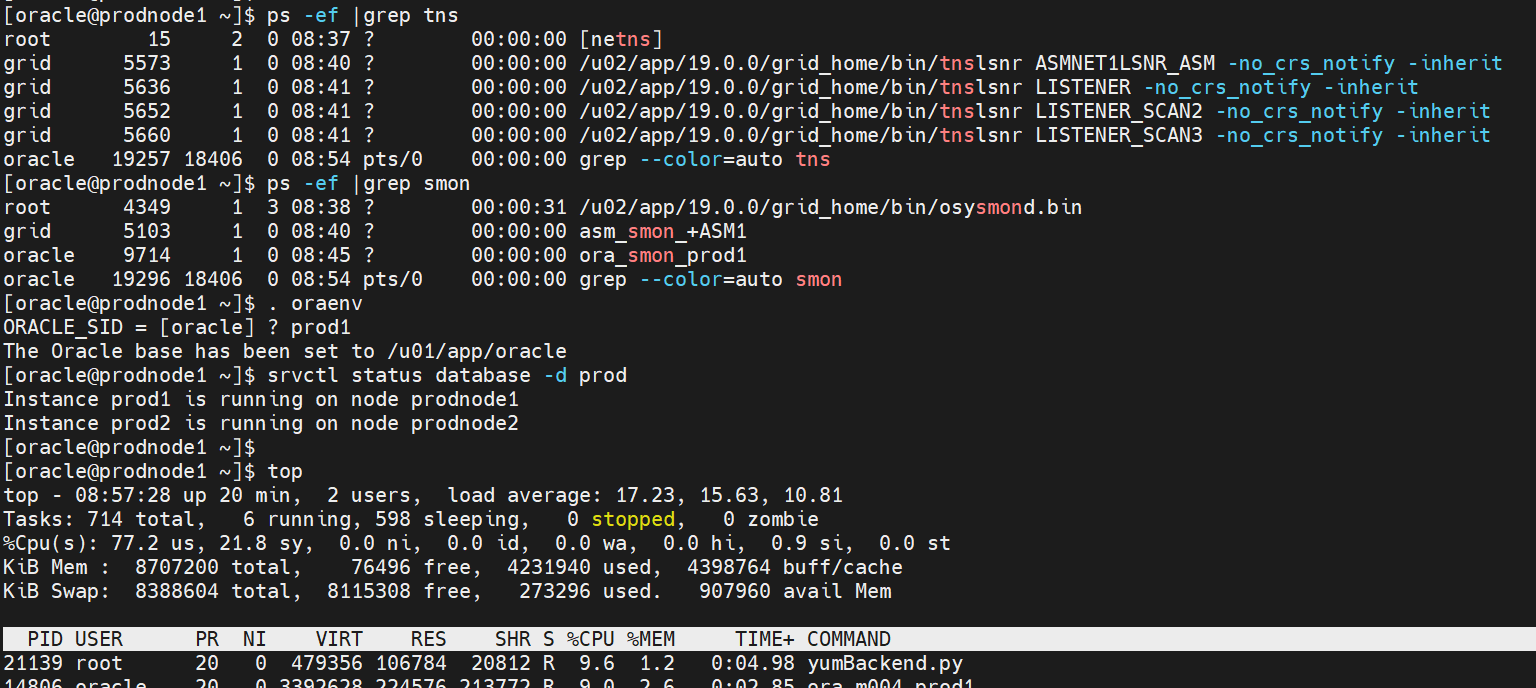
Firstly check the status of database services and load on the servers.


- here i am using 2 Node RAC Database , as we can see from the above snap 2 nodes database are running fine, will bit load on this server.

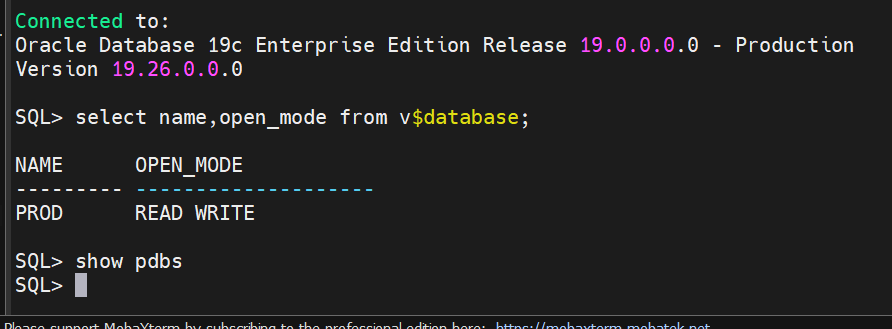
- Check the database status and confirmed its not a multitenant database 


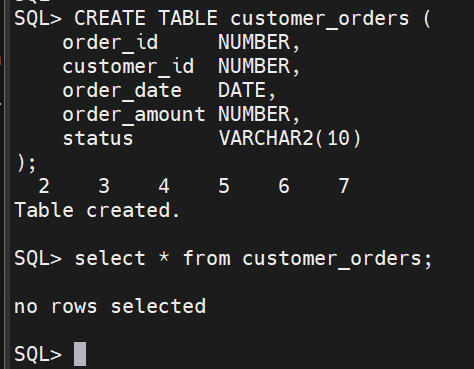
- For SQL Troubleshooting Lab we can create a Table and load some data 

SQL> CREATE TABLE customer_orders (

    order_id     NUMBER,

    customer_id  NUMBER,

    order_date   DATE,

    order_amount NUMBER,

    status       VARCHAR2(10)

);

Table created.

SQL> select * from customer_orders;

no rows selected


- No data in that table , now i can load some data 

SQL> BEGIN

  FOR i IN 1 .. 500000 LOOP

  INSERT INTO customer_orders VALUES (

      i,

      MOD(i, 1000),

      SYSDATE - MOD(i, 365),

      ROUND(DBMS_RANDOM.VALUE(100, 10000)),

      CASE WHEN MOD(i, 3) = 0 THEN 'NEW'

           WHEN MOD(i, 3) = 1 THEN 'CLOSED'

           ELSE 'PENDING' END

    );

  END LOOP;

  COMMIT;

END;

 /


PL/SQL procedure successfully completed.

SQL> select count(*) from customer_orders;

  COUNT(*)

----------

    500000


- Now i have loaded 5 lakh rows of data.

- From this table we try to access the data and we can identify how much resource it consume like CPU memory and whether its taking full table scan or how we can see it.

-  this sql is insufficient.

SELECT * FROM customer_orders WHERE TO_CHAR(order_date, 'YYYY-MM-DD') = '2025-06-28' AND status = 'NEW';


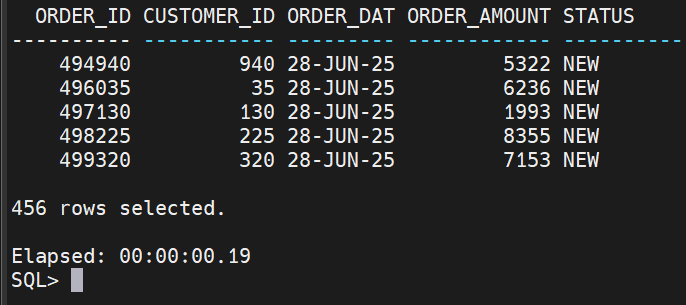
- Here we can see more rows of data  , problems from this query is TO_CHAR() disables index usage , Causes Full table scan , also it leads to High CPU and I/O usage.

Now here is main point how we can troubleshoot this problematic sql .

- Generate explain Plan for this sql .

EXPLAIN PLAN FOR SELECT * FROM customer_orders WHERE TO_CHAR(order_date, 'YYYY-MM-DD') = '2025-06-28' AND status = 'NEW';


- here can see this sql is full table scan


- we can generate AWR and monitor this sql .

@$ORACLE_HOME/rdbms/admin/awrrpt.sql 

we can check the TOP sql   by Elapsed time / Buffer Gets also look for db file scattered read( sign of Full Table scan).

- Monitor the active sql's which are executing this sql will work from 19C db onwards.


SQL> SELECT sql_id, sql_text, status, elapsed_time, cpu_time

FROM v$sql_monitor WHERE status = 'EXECUTING';

 no rows selected


How to Troubleshoot the above Full table scan ? 

- From the above sql we identified problems which are

Issue 1 :  TO_CHAR() disables index usage , Causes Full table scan 

Fix for Issue 1 : 

SQL> SELECT * FROM customer_orders WHERE order_date = TO_DATE('2025-06-28', 'YYYY-MM-DD') AND status = 'NEW';

no rows selected

- Add index to that table .

SQL> CREATE INDEX idx_order_date_status ON customer_orders(order_date, status);

Index created.


- re-run the explain plan and see the output .

EXPLAIN PLAN FOR SELECT * FROM customer_orders WHERE order_date = TO_DATE('2025-06-28', 'YYYY-MM-DD') AND status = 'NEW';

Explained.


- Now its Index  range scan we avoid the full table scan . 

SQL Monitor report: should show reduced elapsed time
AWR: reduced cost/CPU/IO stats

Post Index creation You should see faster execution and lower logical reads .


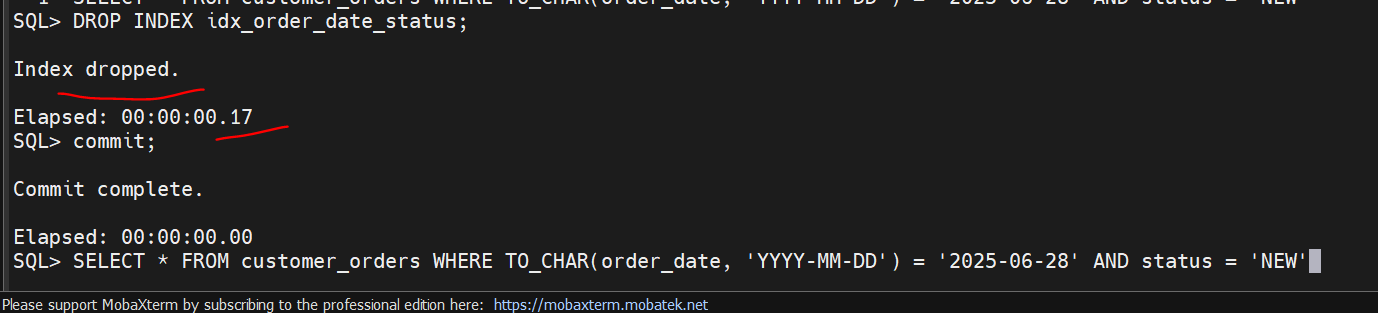
SELECT * FROM customer_orders WHERE TO_CHAR(order_date, 'YYYY-MM-DD') = '2025-06-28' AND status = 'NEW';


without Index :


after index : 


Note: Generally we dont see when we used where clause with small amount of data request but in real time when we are accessing huge amount of data then we can understand clearly the power of Indexing .


Thanks ,
Srini


Saturday, 21 June 2025

Oracle 19C 2 Node RAC Dataguard complete setup step by step process

 Hi All,


In this post i am sharing Oracle 19C RAC 2 Node RAC Dataguard setup.

For this Lab  i have used 4 Virtual machines for Primary and standby servers configurations.

My Primary & Standby Environment details:

======================= =============


>> Primary node (we take as Production - its a live data / live business) .

>> we need to build the standby database for production High availability, in case of production server failures we can use standby server as primary server.

>> my Primary database is 2 nodes 19C RAC database with ASM storage, OS is OEL 7.

>> we need to configure standby servers with 2 Node 19C RAC with ASM Storage, OS OEL 7 .

on standby server we need to configure the Grid infrastructure on both standby nodes, then install the oracle 19C software only on both the standby servers. remain follow below steps to enable Dataguard.


>> Primary node host details /etc/hosts

[oracle@prodnode1 admin]$ cat /etc/hosts

127.0.0.1   localhost localhost.localdomain localhost4 localhost4.localdomain4

::1         localhost localhost.localdomain localhost6 localhost6.localdomain6


#Public

192.168.0.21    prodnode1.localdomain.com       prodnode1

192.168.0.22    prodnode2.localdomain.com       prodnode2

192.168.0.23    prodnode3.localdomain.com       prodnode3


#Private

192.168.1.21    prodnode1-priv.localdomain.com  prodnode1-priv

192.168.1.22    prodnode2-priv.localdomain.com  prodnode2-priv

192.168.1.23    prodnode3-priv.localdomain.com  prodnode3-priv


#VIP

192.168.0.31    prodnode1-vip.localdomain.com   prodnode1-vip

192.168.0.32    prodnode2-vip.localdomain.com   prodnode2-vip

192.168.0.33    prodnode3-vip.localdomain.com   prodnode3-vip


#prod-scan (VIP)

192.168.0.41     prod-scan.localdomain.com      prod-scan

192.168.0.42     prod-scan.localdomain.com      prod-scan

192.168.0.43     prod-scan.localdomain.com      prod-scan


>> Standby node host details /etc/hosts


>> Primary node configuration ( archive log mode, force_loggining mode should be enable)


select name,force_logging,log_mode,FLASHBACK_ON from v$database;

shut immediate

startup mount


alter database archivelog;

alter database force logging;

alter database flashback on;


Check the db_unique_name 

SQL> show parameter db_uniq


NAME                                 TYPE        VALUE

------------------------------------ ----------- ------------------------------

db_unique_name                       string      prod


set linesize 300 pages 100

col value for a45

col name for a25

select name, value

from v$parameter

where name in ('db_name',

'db_unique_name',

'log_archive_config',

'log_archive_dest_1',

'log_archive_dest_2',

'log_archive_dest_state_1',

'log_archive_dest_state_2',

'remote_login_passwordfile',

'log_archive_format',

'log_archive_max_processes',

'fal_client',

'fal_server',

'db_file_name_convert',

'log_file_name_convert',

'standby_file_management');


Configure the standby redo logs : ( 2+1*2) 

=========================

SQL> select GROUP#,THREAD#,BYTES/1024/1024,STATUS,MEMBERS FROM V$lOG;


add the standby redo logs >> these will useful only when you are using max availability and max protection modes.. not in the max performance mode..

ALTER DATABASE ADD STANDBY LOGFILE THREAD 1 group 5('+DATA/PROD/STANDBYLOGS/stdby_01.log') SIZE 200M;  etc ... add +1 extra for each thread for primary .. in your primary if you have 2 groups 4 threads for standby you need to create 2 groups with 3 threads each .

SQL> SELECT INST_ID, GROUP#,THREAD#,SEQUENCE#,ARCHIVED,STATUS FROM GV$STANDBY_LOG ORDER BY 2,1;

no rows selected

Thanks,
Srini